
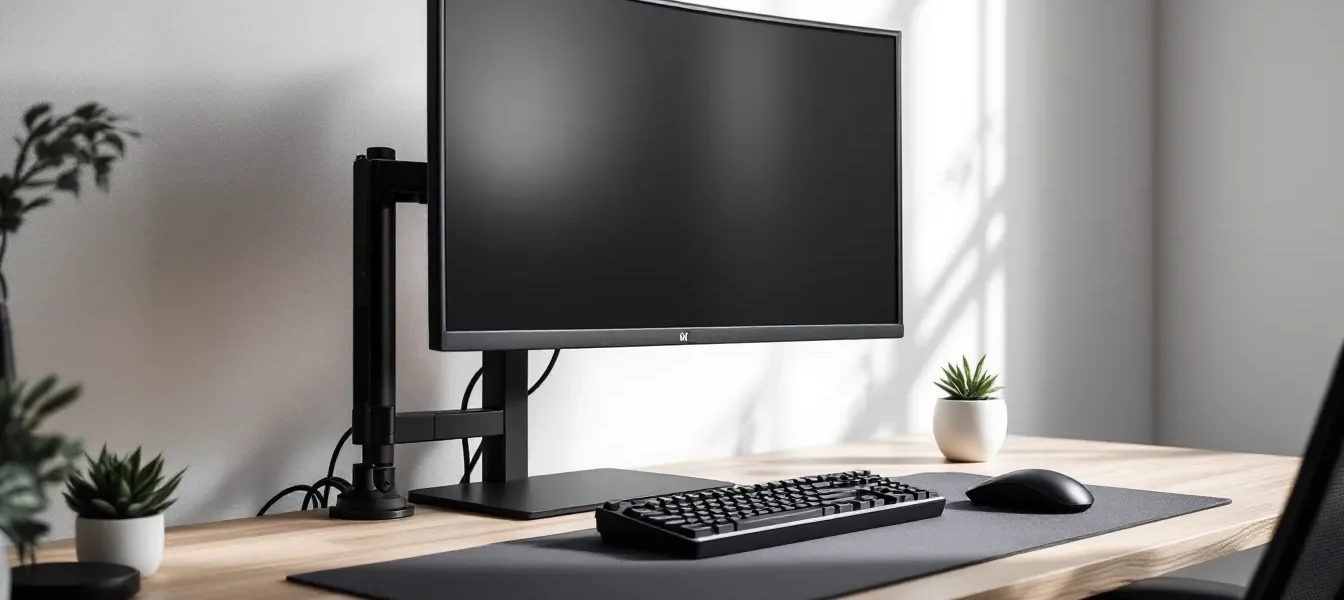
Minimal Gaming Setup: The Complete 2026 Guide to Building Your Perfect Clutter-Free Battle Station
The era of RGB-soaked, multi-monitor monstrosities with every peripheral imaginable isn’t for everyone. A minimal gaming setup strips away the noise, literally and figuratively, to create a space that’s functional, focused, and undeniably clean. It’s not about deprivation: it’s about intentionality. Every item earns its place based on performance and purpose, not hype or aesthetic trends that’ll age out in six months.
In 2026, minimalist battle stations have evolved from niche enthusiasm to mainstream preference. Gamers are realizing that less clutter often means better performance, sharper focus during clutch moments, and easier maintenance. Whether you’re grinding ranked matches, streaming to a growing audience, or just looking to reclaim desk space without sacrificing competitive edge, this guide walks through every decision, from hardware selection to cable routing, that defines a truly minimal gaming setup.
Key Takeaways
- A minimal gaming setup prioritizes intentionality and performance by including only essential components that directly improve gameplay or comfort, eliminating redundancy and trend-driven purchases.
- Streamlined desks with single excellent monitors, compact mechanical keyboards, and wireless peripherals reduce cognitive load, improve focus during competitive moments, and create a visually clean environment that ages better than RGB-heavy builds.
- Strategic cable management through under-desk trays, velcro straps, and hidden routing achieves the invisible aesthetic that defines minimal gaming, making your space photograph well and adapt easily to future upgrades.
- Invest your minimal gaming setup budget primarily in monitor quality, ergonomic seating, and primary input devices that directly affect performance and comfort, then economize on decorative elements and cable accessories.
- Personality emerges through deliberate, limited additions like single meaningful decorative pieces and monochrome or two-tone color schemes rather than accumulation, keeping your minimal setup both functional and personally expressive.
What Is a Minimal Gaming Setup and Why It Matters
The Core Philosophy Behind Minimalist Gaming
Minimalism in gaming isn’t about owning the fewest items possible, it’s about ruthless curation. Each piece of gear serves a clear function, and redundancy gets eliminated. The philosophy rejects impulse purchases driven by marketing hype and instead prioritizes gear that directly impacts gameplay or comfort.
This approach forces honest questions: Do you actually need three different headsets? Will that collectible statue improve your K/D? A minimal setup answers these with a simple test, if removing an item wouldn’t affect your gaming experience or daily workflow, it probably doesn’t belong on your desk.
The mental shift matters as much as the physical one. Committing to minimalism means resisting the constant gear churn that plagues gaming culture. It’s about finding your core loadout and sticking with it until something genuinely improves your setup, not just your aesthetic.
Benefits of Going Minimal: Performance, Focus, and Aesthetics
Clutter creates cognitive load. Studies on workspace organization consistently show that visual noise increases mental fatigue and reduces task performance. In gaming terms, that translates to slower reaction times and weaker decision-making during crucial moments.
A streamlined desk means fewer distractions when you’re tracking enemy movements or managing cooldowns. Your peripheral vision isn’t catching random RGB reflections or stacks of game cases. The space feels intentional, which subconsciously reinforces focus.
From a performance standpoint, minimal setups often run cooler and quieter. Fewer devices mean less heat generation, better airflow around your rig, and reduced electromagnetic interference. Cable management stops being a nightmare when you’ve only got essential connections to manage.
Aesthetically, minimalism ages better than trend-chasing builds. Clean lines and neutral tones don’t scream “2022 RGB explosion” three years later. Your setup photographs well, looks professional on stream, and adapts easily when you do upgrade a component.
Essential Hardware for Your Minimal Gaming Setup
Choosing the Right Gaming PC or Console
The PC versus console debate for minimal setups comes down to space and purpose. A PlayStation 5 or Xbox Series X occupies minimal desk real estate and handles 4K gaming without visible cable spaghetti. Console gamers benefit from plug-and-play simplicity and a single power cable.
For PC builds, consider SFF (small form factor) cases or compact ATX builds that don’t sprawl across your desk. The NZXT H1 or Fractal Design Terra offer powerful builds in footprints smaller than most mid-towers. Prioritize quality cooling in smaller cases, good airflow prevents thermal throttling without requiring massive radiators.
In 2026, pre-built systems from companies like Tom’s Hardware benchmarks have validated offer competitive value if configured correctly. Strip out bloatware immediately and disable unnecessary RGB through BIOS. The goal is performance per watt and cubic inch, not flashy lighting modes.
Laptop gaming rigs like the ASUS ROG Zephyrus or Razer Blade 15 eliminate tower clutter entirely. Pair with a single external monitor when docked, disconnect when mobile. This approach works exceptionally well for gamers who value flexibility over absolute maximum FPS.
Monitor Selection: Size, Refresh Rate, and Placement
One excellent monitor beats two mediocre screens every time in a minimal setup. The sweet spot for most gamers in 2026 remains 27 inches at 1440p with 144Hz+ refresh rates. This balances screen real estate, pixel density, and competitive performance without overwhelming your desk.
For competitive FPS players, 24-inch 1080p displays at 240Hz or higher still dominate. The smaller size means less eye movement during tracking, and the higher refresh rate provides genuine advantages in games like Valorant or Counter-Strike 2. OLED panels have finally hit the gaming monitor market at reasonable prices, offering perfect blacks without the backlight bleed that plagued early models.
Ultrawide monitors (21:9 or 32:9) can work for minimal setups if you’re willing to commit. A single 34-inch ultrawide replaces dual monitor configurations for productivity and offers immersive gaming in supported titles. But, compatibility varies, competitive games often lock to 16:9, making ultrawides less versatile.
Mount your display on a monitor arm rather than using the included stand. VESA mounts free up desk space underneath, improve ergonomic positioning, and create that floating aesthetic minimal setups thrive on. Cable management becomes trivial when routed through the arm.
Keyboard and Mouse: Quality Over Quantity
You need exactly one keyboard and one mouse. Enthusiast culture pushes constant rotation of boards and mice, but minimal gaming demands commitment to perfected tools.
For keyboards, 60% or 65% layouts strip away the numpad and function row, drastically reducing footprint without sacrificing gaming essentials. Brands like Keychron, Ducky, and Wooting offer compact mechanical boards with high polling rates and customizable actuation. Hot-swap sockets let you experiment with switch types without buying multiple boards.
Wireless has finally reached parity with wired in 2026. Logitech’s Lightspeed and Razer’s HyperSpeed technologies deliver sub-1ms latency indistinguishable from cables. The visual cleanliness of wireless peripherals aligns perfectly with minimal aesthetics, though you’ll need disciplined charging habits.
For mice, shape and sensor matter more than feature count. The Logitech G Pro X Superlight and Razer Viper V3 Pro represent minimalist design philosophy, no unnecessary buttons, no RGB vomit, just flawless tracking and ergonomics. Many professional players using configurations from ProSettings favor these stripped-down designs for consistent performance.
Avoid the temptation of macro pads, secondary keyboards, or mouse bungees. If you genuinely need macros, program them into unused mouse buttons or keyboard layers. Every additional device works against your minimal goals.
Audio Solutions That Don’t Clutter Your Space
Headset stands are visual clutter. Instead, mount a small adhesive hook under your desk to hang headsets when not in use. This keeps them accessible without occupying valuable desk space or creating another visual element competing for attention.
For audio quality, consider desktop DAC/amp combos that stack or integrate. The Schiit Fulla or Creative Sound Blaster X3 provide excellent audio in compact footprints. Route the single USB cable through your cable management system.
Wireless headsets eliminate one more cable but require charging discipline. SteelSeries Arctis Nova Pro Wireless and HyperX Cloud Alpha Wireless offer 30+ hour battery life, meaning weekly charging rather than nightly anxiety. Keep the charging cable velcro-tied under your desk for quick top-ups without permanent visual presence.
Speakers seem counterintuitive for minimal setups, but compact powered monitors like the AudioEngine A2+ or Kanto YU2 deliver quality sound in tiny enclosures. Position them on small stands or wall-mount them to avoid desk clutter. They serve double duty for music and casual gaming when you don’t want headsets on.
Desk and Furniture Choices for a Clean Gaming Space
Selecting the Perfect Minimalist Gaming Desk
The desk defines everything in a minimal setup. Look for clean lines, integrated cable management, and sufficient depth, at least 24 inches to properly distance your monitor while leaving room for keyboard and mouse.
Standing desk frames like FlexiSpot or Uplift paired with custom butcher block or laminate tops create personalized minimal workstations. The motorized height adjustment adds functionality without cluttering your space with separate risers or platforms. Cable management trays mount directly to the underside, keeping everything hidden.
Desk size requires honest assessment of your actual needs. The 60-inch desk might look impressive, but if you’re running a single monitor with a 65% keyboard, you’re just creating empty space that’ll accumulate clutter. A 48-inch desk often provides the sweet spot, enough room to work comfortably without vast expanses begging to be filled.
Avoid gaming desks with built-in RGB, cup holders, headset hooks, or controller stands. These gimmicks look dated immediately and contradict minimal principles. A simple rectangular surface in black, white, or natural wood tones adapts to any aesthetic shift.
Material matters for both function and appearance. Solid wood develops character over time but requires maintenance. Laminate tops resist stains and moisture while maintaining clean appearances. Avoid glass, it shows every fingerprint and cable shadow, creating visual noise even when technically clean.
Ergonomic Seating Without the Bulk
Gaming chairs with racing stripes and excessive padding work against minimal aesthetics. Instead, look at ergonomic office chairs from Herman Miller, Steelcase, or Autonomous. The Herman Miller Aeron or Steelcase Gesture offer superior ergonomics in visually understated packages.
These chairs cost more upfront but eliminate the three-year replacement cycle of budget gaming chairs. The mesh construction maintains consistent comfort during marathon sessions without the bulk of padded racing seats. Neutral colors, black, gray, or white, integrate seamlessly into minimal spaces.
For budget-conscious builders, the Ikea Markus or Autonomous ErgoChair Core deliver solid ergonomics under $300. They lack the adjustability of premium models but provide lumbar support and breathable materials in clean designs.
Position matters as much as the chair itself. Your monitor should sit at eye level when seated with proper posture, keyboard at elbow height, feet flat on the floor. Achieving this naturally, without footrests, monitor risers, or lumbar pillows, creates the cleanest visual result.
Cable Management Strategies for a Clutter-Free Look
Hidden Cable Routing Techniques
Cable management separates amateur setups from genuinely minimal battle stations. The goal isn’t just organization, it’s invisibility. When someone photographs your desk, they shouldn’t see a single cable.
Start with a cable management tray mounted under your desk. J-channel raceways from brands like Monoprice or Amazon Basics run the full desk length, hiding power strips and excess cable length. Route every cable through the tray first, then bring only the necessary length up to each device.
Use cable sleeves for the final run from desk underside to peripherals. Braided or neoprene sleeves bundle multiple cables into a single visual element. Match the sleeve color to your desk leg or wall color to minimize visual impact.
Velcro straps beat zip ties for minimal setups. Hardware changes happen, new peripherals, monitor upgrades, peripheral swaps. Velcro lets you adjust quickly without cutting zip ties and starting over. Color-matched velcro straps in black or white disappear against cable bundles.
Power management gets overlooked. A surge protector with individual switches lets you kill power to idle devices without unplugging cables. Some models include USB ports, reducing the need for separate charging blocks. Mount it inside your cable tray for complete concealment.
Wireless Peripherals vs. Wired Solutions
Wireless eliminates visible cables but introduces charging requirements. The trade-off makes sense for keyboards and mice, two cables removed for occasional charging sessions. Headsets push the boundary: audio quality advantages of wired connections have narrowed, but battery weight remains noticeable.
For truly minimal setups, wireless peripherals win on aesthetics alone. Modern polling rates (1000Hz+) and latency (<1ms) make performance differences negligible outside of professional competition. If you’re not competing in tournaments, the cable elimination matters more than theoretical response time advantages.
Hybrid approaches work well: wireless mouse and keyboard, wired headset. This removes the two most visible cables while maintaining infinite battery life for audio. Route the single headset cable along your desk edge with small cable clips for quick disconnection.
Consider wireless charging pads for mice that support it, like the Logitech G series with Powerplay. The mousepad doubles as a charging surface, eliminating charging cables entirely. It’s an expensive solution but achieves true wireless peripheral operation.
Lighting and Ambiance in Minimal Gaming Setups
Strategic LED and Ambient Lighting Placement
Bias lighting behind your monitor reduces eye strain and adds depth without cluttering your desk surface. LED strips with adhesive backing mount to the monitor’s rear edge, casting indirect light onto the wall. This creates ambient glow visible on camera or in person without introducing additional devices.
Skip RGB mode cycling, it’s visual noise. Set a single color temperature and stick with it. Warm whites (2700K-3000K) work for evening gaming, while neutral whites (4000K-5000K) suit daytime streaming. Color accuracy matters if you’re streaming or creating content: calibrated LED strips ensure consistent appearance across recordings.
Governdriven Nanoleaf panels or similar modular lighting creates dramatic effects but walks the line of minimal philosophy. If implemented, limit to a small 3-5 panel arrangement as accent lighting rather than covering entire walls. The geometry should enhance your space, not dominate it.
Desk lamps seem counterintuitive but serve dual purposes. A minimalist LED desk lamp like the BenQ ScreenBar mounts directly to your monitor, providing task lighting without occupying desk space. It illuminates your keyboard and desk area during non-gaming activities while remaining invisible during gameplay.
Natural Light Optimization
Window positioning determines your entire desk layout. Never position your monitor directly facing or backing windows, you’ll fight glare or create silhouette issues for video calls and streaming. Place your desk perpendicular to windows when possible.
Blackout curtains or roller shades give you control without permanent installation. During competitive sessions or streaming, you want consistent lighting. Natural light fluctuates, causing exposure shifts and screen glare. Controllable window treatments let you leverage natural light for daytime productivity, then eliminate it for evening gaming.
If you’re locked into window-facing desk placement, invest in a monitor with high brightness (400+ nits) and anti-glare coating. Matte displays handle ambient light better than glossy panels. Position the monitor slightly angled to deflect direct sunlight.
Morning and evening light angles change throughout the year. What works in winter might become unplayable during summer afternoons. Build flexibility into your setup, adjustable monitor arms and movable desk lamps adapt to seasonal lighting shifts without requiring complete reorganization.
Storage and Organization Solutions
Hidden Storage Options for Gaming Gear
Controllers, cables, and accessories accumulate fast. The solution isn’t more visible storage, it’s concealed organization. Desk drawers should house everything that isn’t actively in use. A single shallow drawer holds controllers, charging cables, and backup peripherals without visible clutter.
Under-desk mounted storage boxes or cable trays with lids keep items accessible but invisible. These work well for headset stands, cleaning supplies, or seasonal peripherals (like fight sticks used only for specific games). Magnetic strips inside drawers secure small items like extra keycaps or mouse feet.
For console gamers, media centers with closed cabinets hide the console itself during non-gaming hours. Ensure adequate ventilation, the PS5 and Xbox Series X generate significant heat. Rear cabinet openings or ventilated doors prevent thermal issues while maintaining clean appearances.
Pegboards mounted inside closets or cabinet doors create invisible organization systems. When the door closes, your collection of cables, adapters, and accessories disappears. When you need something, everything has a designated spot for immediate retrieval.
Digital Game Libraries vs. Physical Collections
Physical game collections work against minimal principles. Shelves of game cases add visual weight and accumulate dust. Digital libraries, Steam, Xbox Game Pass, PlayStation Store, eliminate physical storage entirely.
The shift to digital distribution in 2026 makes this easier than ever. Game Pass Ultimate provides 400+ titles without owning a single disc. Steam’s library scales infinitely without requiring additional shelf space. Cloud saves sync across devices, eliminating the need to store physical media for preservation.
For collectors attached to physical editions, limit displays to genuine favorites, maybe 3-5 games with personal significance. Store the rest in closed cabinets or transition to displaying cover art digitally through rotating desktop wallpapers or digital frames.
External SSD storage for digital libraries creates a minimal footprint. A single 2TB Samsung T7 drive holds dozens of installed games in a device smaller than a phone. Keep it in a drawer or mounted under your desk with velcro, out of sight until needed for expanded storage.
Budget Considerations: Minimal Doesn’t Mean Expensive
Prioritizing Your Spending for Maximum Impact
Minimal gaming setups can cost less than cluttered builds because you’re buying fewer items total. The trick is allocating budget to components that directly affect gaming experience or long-term comfort.
Spend most on your monitor, chair, and primary input devices. These are the interfaces between you and games, where quality differences materially affect performance and comfort. A $400 monitor with accurate colors and high refresh rate beats a $200 monitor plus $200 of RGB accessories.
Desk and ambient lighting fall into the mid-priority tier. A solid desk costs $200-500 and lasts a decade. Budget desks wobble, use materials that warp, and require replacement within years. The longevity justifies the upfront cost.
Low-priority spending includes decorative elements, cable management accessories, and aesthetic upgrades. Inexpensive cable management works as well as premium solutions. Basic velcro straps and raceways accomplish the same invisibility as branded systems at a fraction of the cost.
Guides on assembling budget builds from sources like How-To Geek emphasize this same principle, invest where it matters, economize on commodities. A minimal setup naturally aligns with this by eliminating non-essential spending entirely.
Affordable Alternatives to Premium Minimal Gear
Wireless peripherals command premium prices, but wired alternatives perform identically for less. A wired Logitech G203 delivers the same sensor quality as wireless models at half the price. Cable management handles the single wire, maintaining minimal aesthetics.
Monitor arms seem expensive at $100+, but budget models from AmazonBasics or VIVO perform the core function for $30-50. They lack the smooth adjustment or premium finishes of Ergotron arms, but they mount monitors and clear desk space identically.
IKEA solutions dominate budget minimal builds. The Karlby countertop paired with Alex drawers creates a standing desk alternative under $300. It lacks motorized adjustment but provides identical surface area and storage. The Markus chair offers ergonomic basics at $200 versus $1000+ Herman Miller models.
DIY cable management costs almost nothing. Binder clips attached to desk edges guide cables. Toilet paper tubes wrapped in black paper bundle cables temporarily. Velcro cable ties cost $5 for fifty. Spending $100+ on cable management contradicts minimal philosophy when dollar-store solutions achieve identical results.
For lighting, basic LED strips from hardware stores provide bias lighting for $15-20. They lack app control or fancy modes, but minimal setups use static colors anyway. Controlled via simple remotes, they eliminate the temptation of RGB cycling while saving $50+ versus gaming-branded alternatives.
Personalizing Your Minimal Setup Without Adding Clutter
Decorative Touches That Enhance Rather Than Overwhelm
Minimal doesn’t mean sterile. Personality comes through deliberate, meaningful additions rather than accumulation. A single piece of art, one small plant, or a carefully chosen sculpture creates focus rather than distraction.
Small succulents or snake plants add life without maintenance burden. A single 4-inch pot on your desk corner softens hard edges without sprawling into your gaming space. Avoid multiple plants or large arrangements, they require care, accumulate water stains, and introduce organic clutter.
Framed artwork or posters should be high quality and limited. One large piece makes a stronger statement than three small prints. Mount it behind your setup for video calls or streaming backgrounds, not directly in your sightline during gaming. The art should enhance your space as seen from the doorway, not compete for attention while you’re at the desk.
Figurines or collectibles work only in extreme moderation. One meaningful piece, a character from your favorite game, a trophy from a tournament, serves as a conversation starter without becoming a shelf display. Place it thoughtfully, not as part of a growing collection that’ll require dusting and reorganization.
Balancing Functionality and Personal Style
Color schemes define minimal aesthetics more than individual items. Monochrome setups, all black, all white, or grayscale, create visual cohesion automatically. Every new item gets evaluated: does it match the established palette?
Two-tone schemes add personality while maintaining restraint. Black and white remains classic. Black and wood tones brings warmth. White and silver creates a modern tech aesthetic. Introducing a third color requires exceptional discipline, it becomes an accent that appears only in small doses.
Cable colors matter in visible areas. Black cables on black surfaces disappear: white cables on white desks achieve the same effect. Mixing cable colors creates visual noise even with perfect organization. Replace mismatched cables with color-matched alternatives, they’re cheap and transform appearance immediately.
Personalization happens through the quality and style of chosen items, not quantity. A mechanical keyboard with a premium case expresses personality through craftsmanship. A unique desk lamp shows thoughtful selection. Each item should justify its presence through both function and alignment with your aesthetic vision.
RGB lighting can work in minimal setups if used with restraint. Set everything to a single static color that complements your scheme. White light, warm amber, or subtle blue creates ambiance without the carnival effect of rainbow cycling. Disable all animation modes, static lighting only.
Conclusion
Building a minimal gaming setup requires more discipline than throwing together a standard battle station. Every purchase decision carries weight because every item remains visible. But the payoff extends beyond aesthetics, you’ll game with sharper focus, maintain your space more easily, and avoid the upgrade treadmill that empties wallets without improving performance.
The minimal approach scales with any budget. A $500 console setup on an IKEA desk achieves the philosophy as effectively as a $3000 custom PC build on a motorized standing desk. What matters is intentionality, each component serves a clear purpose, nothing is redundant, and the space adapts to you rather than demanding constant reorganization.
Start by auditing your current setup. Remove anything that hasn’t been used in the past month. Consolidate redundant items, you don’t need three mousepads or four headsets. Route the remaining cables properly, carry out basic organization, and live with the stripped-down version for a week. You’ll quickly identify what actually matters versus what was just occupying space.
The gaming landscape will continue evolving, new consoles, GPU generations, and peripheral innovations will emerge. A minimal foundation makes those transitions cleaner. Upgrading one carefully chosen monitor beats replacing a three-monitor setup. Swapping a single wireless mouse takes minutes, not an afternoon of cable reorganization. You’ve built a system that adapts rather than ossifies.
Minimalism in gaming isn’t about deprivation or following aesthetic trends. It’s about creating the ideal environment for performance, then protecting it from the constant noise of marketing and FOMO. Your setup should fade into the background during gameplay, supporting your performance without demanding attention. That’s when you know you’ve achieved truly minimal gaming.